
Event management systemInvitations, RSVPs, registration, QR check-in, certificates and surveys in one panel
With Send Inbox Mail's event management feature, send your invitation as a bulk email, collect RSVPs and registrations in one list, send reminders automatically relative to the event date, keep a waiting list when you're full, scan QR tickets at the door, print name badges, and run a survey and issue certificates afterwards.
No extra fee for the event features; only the emails you send use credits. 250 free trial credits when you sign up.
Event management in 2.5 minutes
Click a chapter to start the video from there. The video is in Turkish.
New features: capacity, name badges and certificates (1.5 min)
A short follow-up video on how the waiting list moves when you're full, how name badges are printed, and how certificates are issued and verified. The video is in Turkish.
Click a chapter to start the video from there.
Invitations and RSVPs: one-click replies
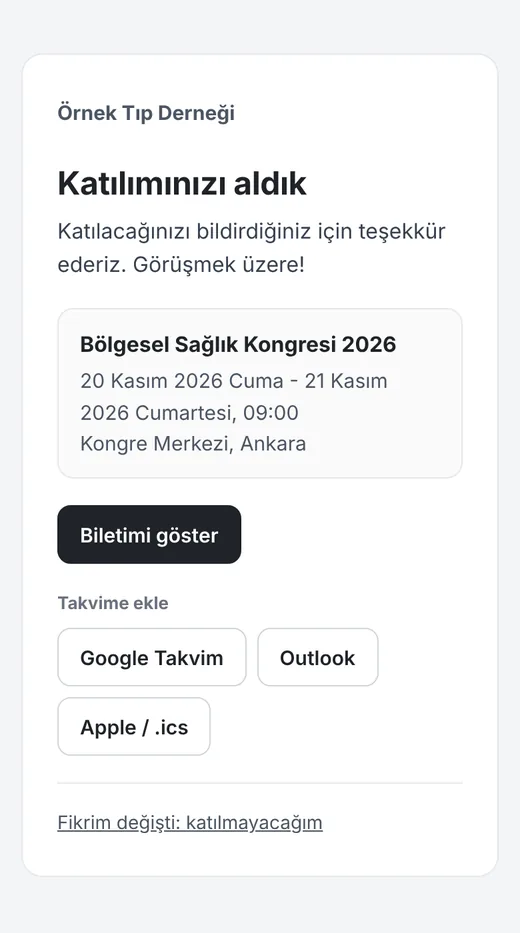
Send your invitation to your existing list. Invitees click Attending or Not attending in the email and their reply is saved under their name. Anyone who changes their mind changes it with one click.
- Replies go straight into automatic Attending and Not attending lists.
- Add-to-calendar works with Google Calendar, Outlook and Apple Calendar.
- Security scanners that open links in emails can't record a reply by mistake.
Event registration form for people outside your invite list
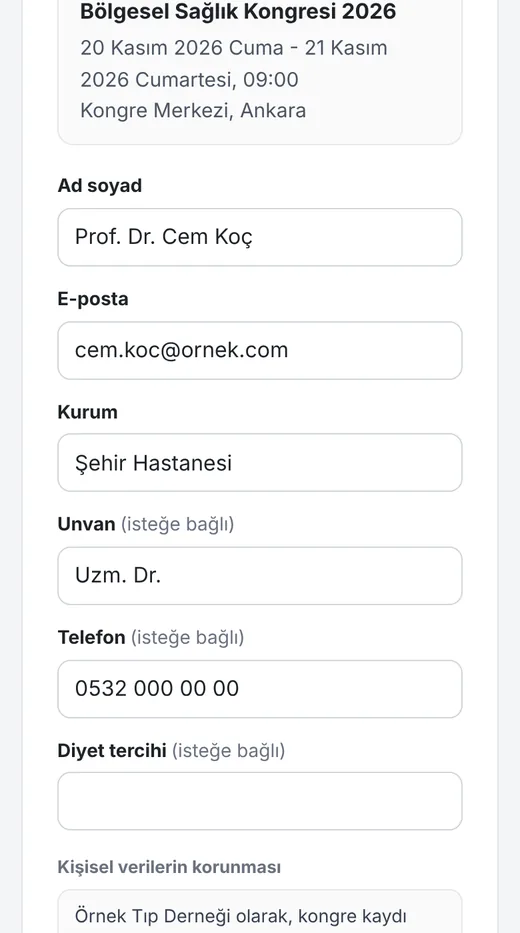
A public registration form you can share on your website, social media or anywhere else. Registrants join your attendee list with their name, organization and job title.
- Make organization, job title, phone and 3 extra fields hidden, optional or required.
- Your privacy notice is shown on the form and consent is stored.
- You write the thank-you text; with check-in on, people see their ticket right away.
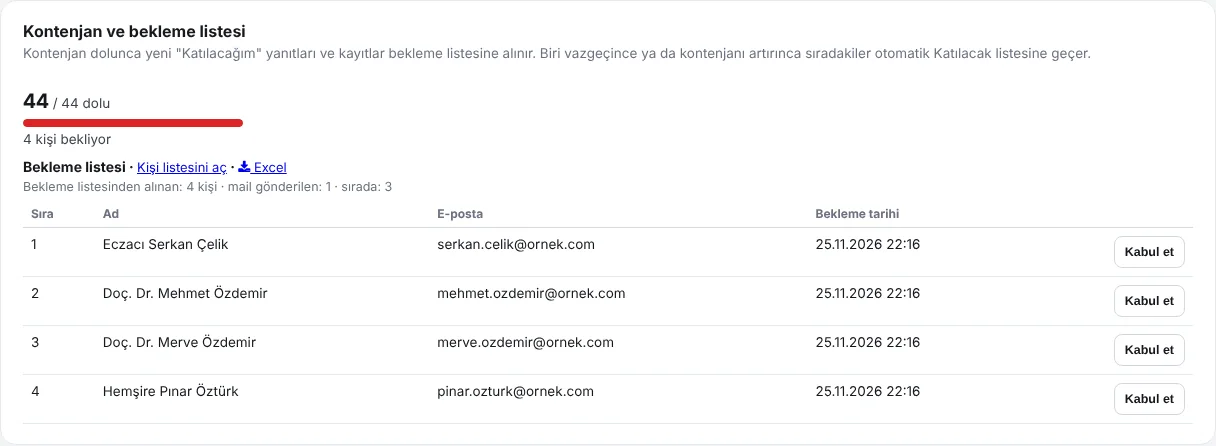
Capacity and waiting list: let the queue move on its own
Set a capacity for your event. Once it's full, new replies and registrations join the waiting list and people see their place in line. When someone cancels or you raise the capacity, the next people move to the attendee list automatically.
- People who get a place automatically receive the "Your place is confirmed" e-mail you choose.
- See the waiting list in order in the panel and accept anyone manually.
- Or turn the waiting list off: once full, people see "Event is full".
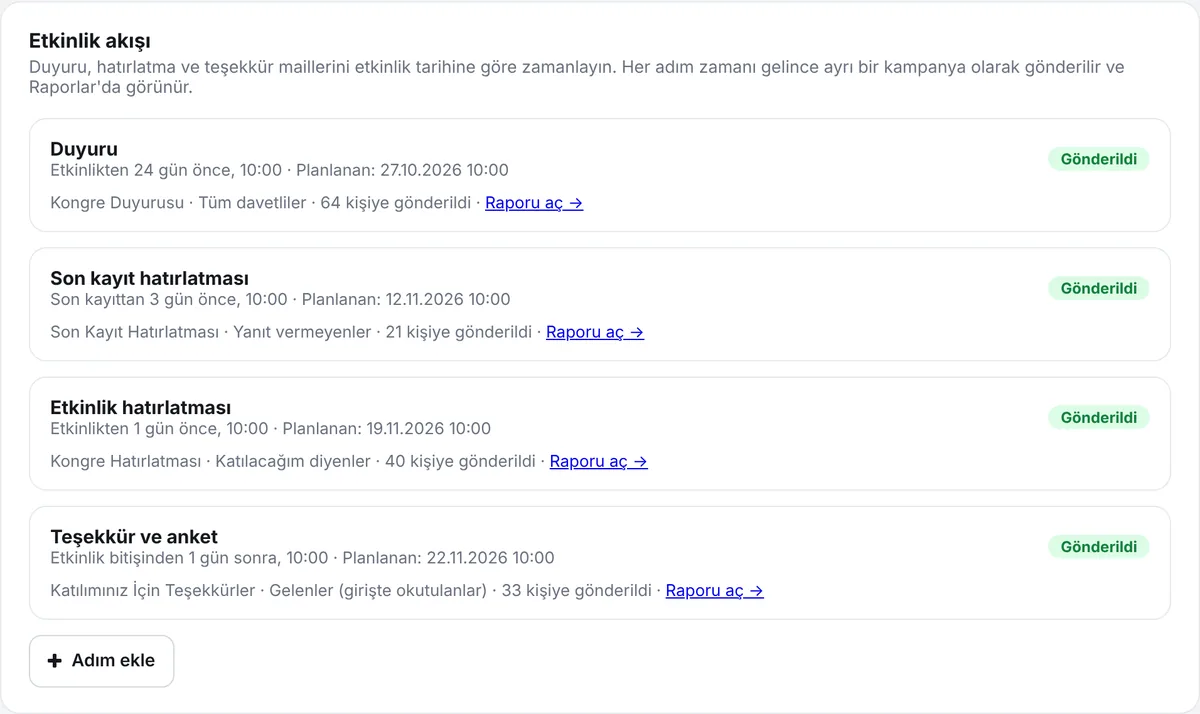
Event flow: announcements and reminders that send themselves
Plan the announcement, registration deadline reminder, event reminder and thank-you email once, relative to the event date. Each step is sent as its own campaign when due and appears in your reports.
- A ready-made pack sets up all four steps in one click; change the dates and times as you like.
- Each step has its own audience: all invitees, no reply, attending, checked in, no-shows.
- If the event date changes, scheduled steps are recalculated.
QR code event check-in from a phone
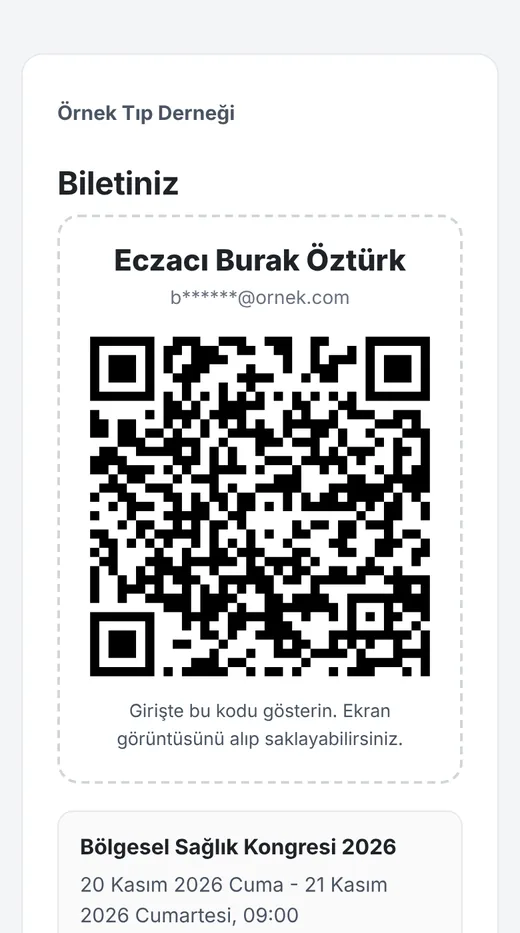
Everyone attending or registered gets a personal QR ticket. Staff at the entrance scan it with their phone camera and you see who has arrived in the panel instantly. No separate app or device needed.
- You send the staff a link; they don't need a panel account.
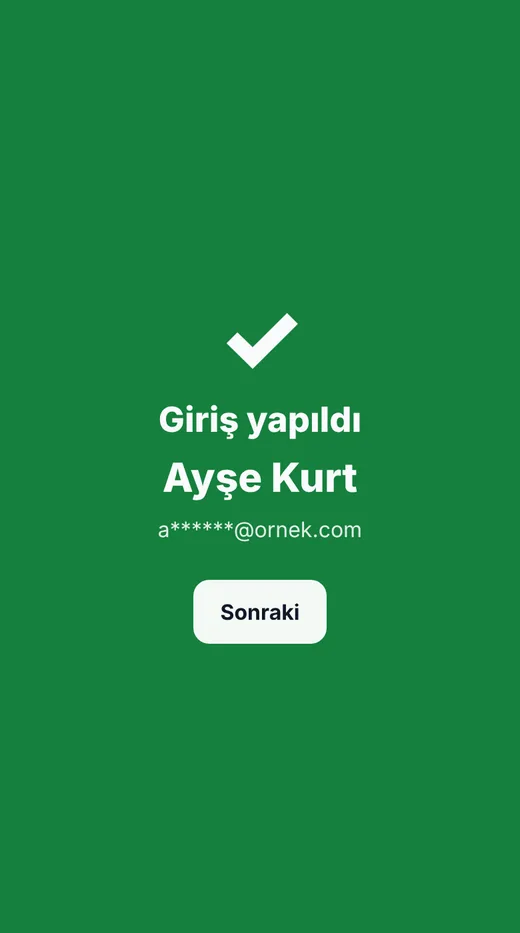
- Green means checked in, orange already checked in, red an invalid ticket.
- Attendees without their ticket are found by name or email.
Name badges: printable cards with QR codes
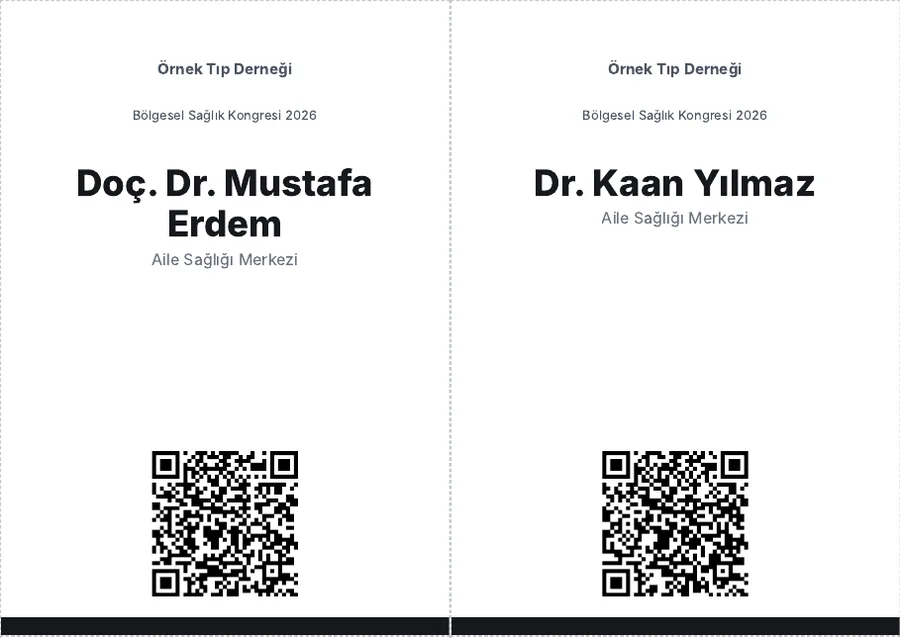
Lay out name badges from your attendee list on A4 pages and print them or save as PDF. Badges show name, job title, organization, event name and your logo; with check-in on, they also carry the QR code scanned at the door.
- Two sizes: A6 lanyard badges (4 per page) and 90 x 55 mm business-card size (10 per page).
- Print only late registrations since a date, or a single badge for someone arriving at the door.
- Long names shrink automatically to fit.
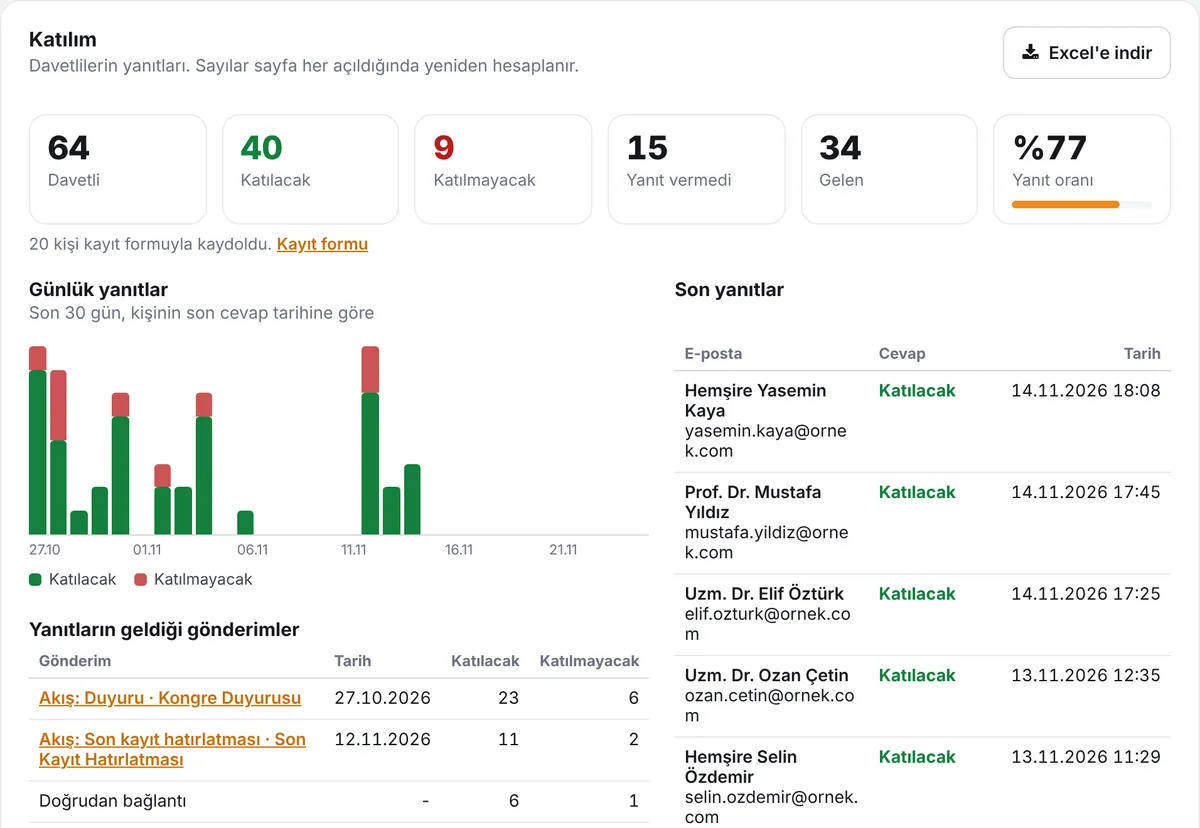
Attendance tracking: who's coming, who came?
Invited, attending, not attending, no reply and checked-in counts on one screen, with a daily reply chart and how many replies each email brought.
- Download attendee, no-reply, checked-in and no-show lists as Excel.
- Registrations from the form appear with their source.
- Events with data are archived instead of deleted, so past lists are never lost.
Post-event survey: measure satisfaction
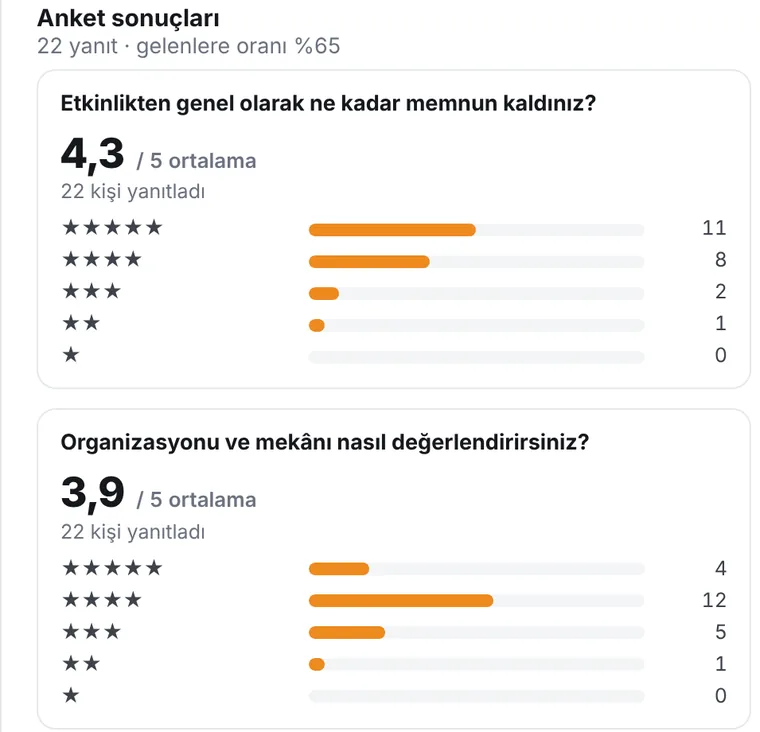
Send attendees a short survey after the event. Start from the ready-made survey or write your own questions, and see averages, distributions and comments in the panel.
- Question types: 5-star rating, recommendation score (NPS, 0-10), single and multiple choice, comment.
- One answer per person; make the survey anonymous if you like.
- Send an automatic reminder to people who haven't answered.
Certificates of attendance: verifiable PDFs from a personal link
After the event, attendees download a PDF certificate with their name from the link in your thank-you e-mail. Use the ready-made design or upload your own image with your logo and signatures.
- Issue certificates to people checked in at the door or to everyone attending; optionally require the survey first.
- Every certificate has a verification code and QR; scanning it shows the certificate is genuine.
- Attendees can correct their name once; see who downloaded it in the panel and in Excel.

How to get started
-
1
Turn it on
Create a free account and turn on Event communication in account settings. Your existing sends aren't affected.
-
2
Enter the event
Enter the date, time, venue or online link and registration deadline once. Calendar invites, pages and emails all use it.
-
3
Send your invitation
Add the RSVP, add-to-calendar, registration and ticket links to your newsletter design and send it to your list.
-
4
Set up the flow
Set up reminders and the thank-you email with the ready-made pack; they go out on their own.
-
5
Scan at the door, send the survey
Give the staff link to your entrance team. After the event, attendees get a thank-you and survey email.
Who is it for?
Congress and conference organizers
Registration and programme announcements, congress-week reminders, QR name badges and certificates of attendance.
Associations and foundations
Invitations to general assemblies, member meetups and fundraisers; know who's coming in advance.
Chambers and professional bodies
Registration forms, reminders and attendance lists for seminars, trainings and industry meetings.
Companies
Dealer meetings, product launches, customer days and internal events in one panel, from invitation to survey.
Education providers
Registrations and attendance tracking for open days, seminars and alumni events.
Online events
Registration, calendar invites, link reminders and a survey afterwards for webinars and live streams.
One panel instead of separate tools
| Task | With separate tools | Send Inbox Mail event management |
|---|---|---|
| Invitations and reminders | Planned by hand in an email tool | Sent automatically relative to the event date |
| RSVPs | Reply emails or a separate form, merged by hand | One click in the email, lists update automatically |
| Registration form | A separate form tool, results exported to Excel | Goes into the same attendee list |
| Check-in | Printed lists or a separate ticketing app | QR with a phone camera, live count |
| Capacity and waiting list | Tracked by hand, e-mailing each free place one by one | The queue moves on its own and the "place confirmed" e-mail goes out automatically |
| Name badges | Copying the list from Excel into a word processor | One click from the attendee list, with QR codes |
| Emails to attendees and no-shows | Lists compared by hand | Ready audiences: checked in, no-shows |
| Post-event survey | A separate survey tool, unclear who answered | Personal links, reminders to non-responders |
| Certificates of attendance | Prepared one by one and sent as e-mail attachments | Personal link, verification code and QR |
Security and privacy
- No real IDs in links
- RSVP, ticket, registration and survey links use encrypted codes; nobody can reach another person's data by editing the address.
- Consent on record
- Your privacy notice is shown on the registration form; consent and registration time are stored.
- Masked email on screen
- Email addresses are partly hidden on tickets and the staff screen; the entrance team doesn't see full addresses.
- Verifiable certificates
- Every certificate has an unguessable verification code; the code or QR shows it was issued at your event.
- Staff link can be renewed
- Renew the staff link with one click and the old one stops working immediately.
Frequently asked questions
Is the event management system paid?
There is no separate subscription for the event features. Every email sent, invitations and reminders included, uses one credit. There is currently no extra charge for registration forms, capacity and waiting lists, QR check-in, name badges, certificates or surveys. You get 250 free trial credits when you sign up.
Do attendees need to install an app?
No. Tickets, registration forms and surveys open in the phone's browser. Attendees can take a screenshot of their ticket and show it at the door.
What do I need to scan QR codes at the door?
A phone with a camera and the staff link from your panel. Staff don't need a panel account. If the same ticket is scanned twice, a warning appears; attendees without their ticket can be searched by name or email.
Can people outside my invite list register?
Yes. The registration form is a public link you can share on your website or social media. Registrants join the Attending list and receive the following reminders.
What happens when the event is full?
With the waiting list on, new replies and registrations join the queue and people see their place. When a place opens up, the next person moves to the attendee list automatically and gets the e-mail you chose. With the waiting list off, no new replies are taken once the event is full.
How are reminder emails scheduled?
You plan each step relative to the event date, for example 1 day before at 10:00, and choose who receives it: all invitees, no reply, attending, checked in, no-shows or people who haven't answered the survey.
Can I use it for online events?
Yes. Enter an online link instead of a venue; it's included in calendar invites and reminder emails. You can leave QR check-in off for online events.
Can I print name badges?
Yes. Print A6 or business-card size badges from your attendee list in the browser, or save them as PDF. Badges carry the same QR as the ticket, so they can be scanned at the door too.
How do I issue certificates of attendance?
Turn on certificates in the panel, choose a design and add the "My certificate" link to your thank-you e-mail. After the event, attendees clicking it download their own PDF certificate. Anyone can check it's genuine with the verification code or QR on it.
Can I export the attendee list?
Yes. Download attending, not attending, no reply, registered, checked-in and no-show lists as Excel, ready for badges and certificates.
How is personal data protected?
Links use encrypted codes instead of real record IDs. You show your own privacy notice on the registration form and consent is recorded. Email addresses are masked on tickets and the staff screen.
Get Started Now
Upload your list, prepare and send your content. 250 free trial credits when you sign up. no credit card required